December 29, 2017

Publish Articles To Your Medium Blog In One Second With Integration Tokens

14:27 Posted by Freblogg , , , , 2 comments

In my article My semi automated workflow for blogging, I have talked about my blogging workflow. There were two main things (actually one thing) in that flow that were not automated. i.e., automatically Uploading to Blogger and automatically Uploading to Medium. I have talked about the first one here. This article is about uploading posts to Medium automatically.

Medium Logo 

Developer documentation for Medium is a breath of fresh air after the mess that is Google API’s. Of course, Google API’s are complex because they have so many different services, but they could’ve done a better job at organizing all that stuff. Anyway, Let’s see how you can use Medium API’s.

Setting Up

We don’t really need any specific dependencies for what we’re doing in this article. You can do everything with urllib which is already part of the python standard library. I’ll be using requests as well to make it a bit more simpler but you can achieve the same without it.

Getting the access token

To authenticate yourself with Medium, you need to get an access token that you’ll pass along to every request. There are two ways to get that token.

  1. Browser-based authentication
  2. Self-issues access tokens

Which one you should go with, depends on what kind of application you’re trying to build. As you can probably guess based on the title, we’ll be covering the second method in this article. The first method needs an authentication server setup which can accept callback from Medium. But, since at this moment, I don’t have that setup, I’m going with the second option.

The Self-issued access tokens method is quite easy to work with as you directly take the access token without having to have the user authenticate via the browser.

To get the access token, Go to Profile Settings and scroll down till you see Integration tokens section.
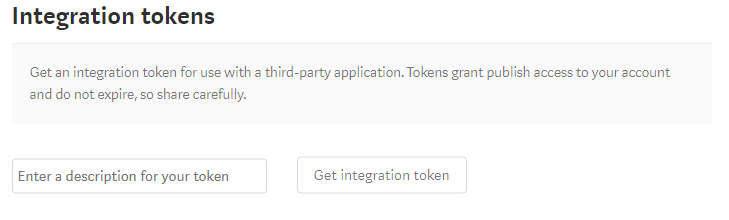
Medium Integration tokens 

There enter some description for what you’re going to use this token and click on Get integration token. Copy that generated token which looks something like 181d415f34379af07b2c11d144dfbe35d and save it some where to be used in your program.

Using Access token to access Medium

Once you have the access token, you’ll use that token as your password and send it along with every request to get the required data.

Let’s get started then. As, I’ve said we’ll be using requests library for url connections. We’ll also be using the json libary for parsing the responses. So, Let’s import them.

import requests
import json

Then use access_token you’ve got and put it in a headers dictionary.

access_token = '181d415f34379af07b2c11d144dfbe35d'
headers = {
    'Authorization': "Bearer " + access_token,
    'User-Agent': 'Mozilla/5.0 (Windows NT 6.3; Win64; x64) AppleWebKit/537.36 (KHTML, like Gecko) Chrome/63.0.3239.84 Safari/537.36'
}

The User-Agent in the above dictionary is required as Medium won’t accept your request otherwise. You don’t have to have the same value as I did.

Validating the access token

First thing to check is if the access_token is valid. You can do that by making a GET request to https://api.medium.com/v1/me and checking the response.

me_url = base_url + 'me'
me_req = ureq.Request(me_url, headers=headers)
me_response = ureq.urlopen(me_req).read()
json_me_response = json.loads(me_response)
print(json_me_response)

And, when I print the json_me_response, which is a json object, I get the following:

{
"data": {
  "id":"5303d74c64f66366f00cb9b2a94f3251bf5adskak7623as",
  "username":"durgaswaroop", 
  "name":"Durga swaroop Perla", 
  "url":"https://medium.com/@durgaswaroop",
  "imageUrl":"https://cdn-images-1.medium.com/fit/c/400/400/0*qVDXEHT9DDYUOcrj."
  }
}

If we got that response like above, then we know that the access token we have is valid.

From there, I extract, the user_id from the JSON string, with

user_id = json_me_response['data']['id']

Get User’s Publications

From the above request, we’ve validated that the access token is correct and we also have got the user_id. Using that we can get access to the publications of a user. For that, we’ve to make a GET to https://api.medium.com/v1/users/{{userId}}/publications and you’ll see the list of the publications by that user.

user_url = base_url + 'users/' + user_id
publications_url = user_url + 'publications/'
publications_req = ureq.Request(publications_url, headers=headers)
publications_response = ureq.urlopen(publications_req).read()
print(publications_response)  

I don’t have any publications on my medium account, and so I got an empty array as response. But, if you have some publications, the response will be something like this.

{
  "data": [
    {
      "id": "b969ac62a46b",
      "name": "About Medium",
      "description": "What is this thing and how does it work?",
      "url": "https://medium.com/about",
      "imageUrl": "https://cdn-images-1.medium.com/fit/c/200/200/0*ae1jbP_od0W6EulE.jpeg"
    },
    {
      "id": "b45573563f5a",
      "name": "Developers",
      "description": "Medium’s Developer resources",
      "url": "https://medium.com/developers",
      "imageUrl": "https://cdn-images-1.medium.com/fit/c/200/200/1*ccokMT4VXmDDO1EoQQHkzg@2x.png"
    }
  ]
}

Now, one weird thing about Medium’s API is that they don’t have a GET for posts. From the API’s we can get a list of all the publications but you can’t get a user’s posts. You can only publish a new post. Although, it is odd for that to be missing, It is not something I’m looking for anyway, as I am only interested in publishing an article. But if you need that, you probably should check to see if there are any hacky ways of achieving the same (at your own volition).

Create a New Post

To create a new post, we have to make a POST request to https://api.medium.com/v1/users/{{authorId}}/posts. The authorId here would be the same as the userId of the user whose access-token you have.

I’m using requests library for this as making a POST request becomes easy with it. Of course, first you need to create a payload to be uploaded. The payload should look something like the following, as described here

{
  "title": "Liverpool FC",
  "contentFormat": "html",
  "content": "<h1>Liverpool FC</h1><p>You’ll never walk alone.</p>",
  "tags": ["football", "sport", "Liverpool"],
  "publishStatus": "public"
}

So, for this, I did the following:

posts_url = user_url + 'posts/'

payload = {
    'title': 'Medium Test Post',
    'contentFormat': 'markdown',
    'tags': ['medium', 'test', 'python'],
    'publishStatus': 'draft',
    'content': open('7.Test_post.md').read()
}

response = requests.request('POST', posts_url, data=payload, headers=headers)
print(response.text)

As you see, for contentFormat, I’ve set markdown and for content I read it straight from the file. I didn’t want to publish this as it is just a dummy post and so I’ve set the publishStatus to draft. And sure enough, it works as expected and I can see this draft added on my account.
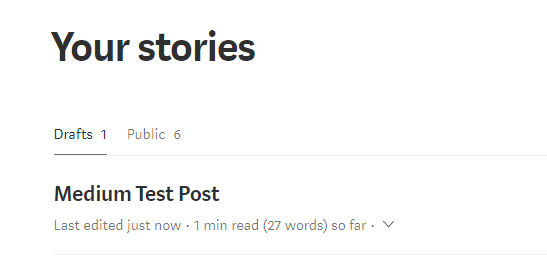
Draft post 

Do note that the title in the payload object won’t actually be the title of the article. If you want to have a title, you add it in the content itself as a <h*> tag.

The full code is available as a gist.

That is all for this article.


For more programming and Python articles, checkout Freblogg and Freblogg/Python

Some articles on automation:

Web Scraping For Beginners with Python

My semi automated workflow for blogging


This is the seventh article as part of my twitter challenge #30DaysOfBlogging. Twenty-three more articles on various topics including but not limited to Java, Git, Vim, Software Development, Python, to come.

If you are interested in this, make sure to follow me on Twitter @durgaswaroop. While you’re at it, Go ahead and subscribe to this blog and my blog on Medium as well.


If you are interested in contributing to any open source projects and haven’t found the right project or if you were unsure on how to begin, I would like to suggest my own project, Delorean which is a Distributed Version control system, built from scratch in scala. You can contribute not only in the form of code, but also with usage documentation and also by identifying any bugs in the functionality.


Thanks for reading. See you again in the next article.

December 27, 2017

Datasets in Apache Spark | Part 1

In my previous post I have talked about Apache Spark. We have also built an application for counting the number of words in a file, which is the hello world equivalent of the big data world.

Apache spark Java Logo’s

It has been over 18 months since that article and spark has changed quite a lot in this time. A new major release of spark, which is spark-2.0 came out and now the latest version is 2.2.1. And with a new version comes new API’s and improvements. In-fact the first thing you’ll probably notice is that, you don’t need to create SparkContext or JavaSparkContext objects anymore. The various context and configurations have been put together into a new class SparkSession. You can still access the SparkContext or the SqlContext from the SparkSession object itself. So, you’ll be starting your programs with this now:

SparkSession spark = SparkSession.builder().appName("Freblogg-Spark").master("local").getOrCreate();

And you can use this spark variable the way you’d use other context variables.

Another change in Spark 2.0 is that, there is a heavy emphasis on the usage of Dataset API’s, and for a good reason. Datasets are more performant and memory efficient than RDD’s. RDD (Resilient Distributed Datasets) have been pushed to second place now. You can still use RDD’s if you want but Datasets are the preferred API. In fact, datasets have some nice convenience methods that we can use them for even unstructured data like text as well. Let’s generate some cool lipsum from Malevole. It looks something like this:

Ulysses, Ulysses - Soaring through all the galaxies. In search of Earth, flying in to the night. Ulysses, Ulysses - Fighting evil 
and tyranny, with all his power, and with all of his might. Ulysses - no-one else can do the things you do. Ulysses - like a bolt of
thunder from the blue. Ulysses - always fighting all the evil forces bringing peace and justice to all....

Now, you might try to use an RDD to read this, but let’s see what we can do with Datasets.

Dataset<String> lipsumDs = spark.read().textFile("fake-text.txt");
lipsumDs.show(5);

Here we are reading the text file using the spark object we created earlier and that gives us a Dataset<String> lipsumDs. The show() method on the dataset object prints the dataset. And we get the following output:

+--------------------+
|               value|
+--------------------+
|Ulysses, Ulysses ...|
|Ulysses, Ulysses ...|
| no-one else can ...|
|  always fighting...|
|                    |
+--------------------+

What we see here are the lines of the text file. Each line in the file is now a row in the Dataset. There are now a rich set of functions available to you in Datasets which weren’t in RDD’s. You can do filters on the rows for certain words, do a count on the table, perform groupBy operations, etc all like you would on a Database table. For a full list of all the available operations on Dataset, read this: Dataset: Spark Documentation.

I hope that’s enough talk about unstructured data analysis. Let’s get to the main focus of this article, which is using Datasets for structured data. More specifically, csv and json. For this tutorial, I am using the data created from Mockaroo, an online data generator. I’ve created 1000 csv records that look like this:

id,first_name,last_name,email,gender,ip_address
1,Netti,McKirdy,nmckirdy0@slideshare.net,Female,148.3.248.193
2,Nickey,Curreen,ncurreen1@tripadvisor.com,Male,206.9.48.216
3,Allayne,Chatainier,achatainier2@trellian.com,Male,191.118.4.217
4,Tades,Emmett,temmett3@barnesandnoble.com,Male,153.113.87.195
5,Shawn,McGenn,smcgenn4@shop-pro.jp,Male,247.45.80.68
6,Giuseppe,Scobbie,gscobbie5@twitter.com,Male,123.114.131.200
...

We’ll use this data, which I’ve put in a file named fake-people.csv, to work with Datasets. Let’s create a Dataset out of this csv data.

Dataset<Row> peopleDs = spark.read().option("header", "true").csv("fake-people.csv");
peopleDs.show(5);

Since we’ve column headers in our data, we add the .option("header", "true") and the output is a nicely formatted table of the data with all the columns like this:


+---+----------+----------+--------------------+------+--------------+
| id|first_name| last_name|               email|gender|    ip_address|
+---+----------+----------+--------------------+------+--------------+
|  1|     Netti|   McKirdy|nmckirdy0@slidesh...|Female| 148.3.248.193|
|  2|    Nickey|   Curreen|ncurreen1@tripadv...|  Male|  206.9.48.216|
|  3|   Allayne|Chatainier|achatainier2@trel...|  Male| 191.118.4.217|
|  4|     Tades|    Emmett|temmett3@barnesan...|  Male|153.113.87.195|
|  5|     Shawn|    McGenn|smcgenn4@shop-pro.jp|  Male|  247.45.80.68|
+---+----------+----------+--------------------+------+--------------+

You can read in json data similarly as well. So, I generated some json this time from mockaroo.

{"id":1,"first_name":"Zenia","last_name":"Joberne","email":"zjoberne0@foxnews.com","gender":"Female","ip_address":"214.207.159.43"}
{"id":2,"first_name":"Renard","last_name":"Kezor","email":"rkezor1@elpais.com","gender":"Male","ip_address":"199.3.18.104"}
{"id":3,"first_name":"Briant","last_name":"Patel","email":"bpatel2@odnoklassniki.ru","gender":"Male","ip_address":"111.184.217.23"}
{"id":4,"first_name":"Robinett","last_name":"Heasley","email":"rheasley3@tiny.cc","gender":"Female","ip_address":"21.40.190.226"}
{"id":5,"first_name":"Rosalinda","last_name":"Glandfield","email":"rglandfield4@indiegogo.com","gender":"Female","ip_address":"26.16.4.132"}
{"id":6,"first_name":"Haslett","last_name":"Culligan","email":"hculligan5@meetup.com","gender":"Male","ip_address":"201.191.72.10"}
....

Note: Spark can read json only of this format where we have one object per row. Otherwise you will see _corrupt_record when you print your dataset. That’s your cue to make sure the json is formatted as per spark’s need.

And you read json very similar to the way you read csv. Since in json we don’t have headers, we don’t need the header option.

Dataset<Row> peopleJsonDs = spark.read().json("fake-people.json");
peopleJsonDs.show(5);

And the output is,

+--------------------+----------+------+---+--------------+---------+
|               email|first_name|gender| id|    ip_address|last_name|
+--------------------+----------+------+---+--------------+---------+
|psurgison0@istock...|   Prissie|Female|  1| 48.151.89.171| Surgison|
| rsewell1@jalbum.net|    Robena|Female|  2| 184.16.37.210|   Sewell|
|aluxon2@list-mana...| Annamarie|Female|  3| 254.69.187.23|    Luxon|
|sodoherty3@twitpi...|   Shannah|Female|  4| 0.245.101.197|O'Doherty|
| alodford4@jigsy.com|     Alice|Female|  5|70.217.170.182|  Lodford|
+--------------------+----------+------+---+--------------+---------+

You can see the order of columns is jumbled. This is because JSON data doesn’t usually keep any specified order and so, when you read JSON data into a dataset, the order might not be same as what you’ve given. Of course if you want to display the columns in a particular order, you can always do a select operation.

peopleJsonDs.select("id", "first_name", "last_name", "email", "gender", "ip_address").show(5);

And that would print it in the right order. This is exactly like the SELECT query in SQL, if you’re familiar with it.

Now, that we have seen how to create Datasets, let’s see some of the operations we can perform on them.

Operations on Datasets

Datasets are built on top of Dataframes. So, if you’re already familiar with Dataframes in the spark 1.x releases you already know a ton about Datasets. Some of the operations you can perform on Dataset are as follows:

Column selection

Select one or more columns from the dataset.
peopleDs.select("email").show(5); // Selecting one column
peopleDs.select(col("email"), col("gender")).show(5); // Selecting multiple columns

Note: col is a static import of org.apache.spark.sql.functions.col;

Filtering on columns

Filter a subset of rows in the dataset based on conditions.
// Filter rows with id > 5 and \<= 10
peopleDs.filter(col("id").$less$eq(10).and(col("id").$greater(5))).show();

Dropping columns

Remove one or more columns from the dataset
peopleDs.drop("last_name", "ip_address").show(5);

Sorting on columns

peopleDs.sort(desc("first_name")).show(5);

And that sorts the dataset in the reverse order of the column first_name.

Output:

+---+----------+---------+--------------------+------+-------------+
| id|first_name|last_name|               email|gender|   ip_address|
+---+----------+---------+--------------------+------+-------------+
|685|  Zedekiah|  Brockie|zbrockiej0@mozill...|  Male|105.119.18.98|
|308|     Zarla| Bryceson|zbryceson8j@redif...|Female|55.118.168.15|
|636|  Zacherie|   Kermon|zkermonhn@prnewsw...|  Male| 120.36.10.87|

Those are some of the functions that you can use with Datasets. There are still several Database table type operations on Datasets, like group By, aggregations, joins, etc. We’ll look at them in the next article on Spark as I think this article already has a lot of information already and I don’t want to overload you with information.

So, that is all for this article. If you’re someone that has never tried Datasets or Dataframes, I hope this article gave a good introduction on the topic to keep you interested in learning more.

The full code is available as gist.


For more Java, Apache Spark, Big data and other programming articles, checkout Freblogg, Freblogg/Java, Freblogg/Spark


This is the fifth article as part of my twitter challenge #30DaysOfBlogging. Twenty-five more articles on various topics including but not limited to Java, Git, Vim, Software Development, Python, to come.

If you are interested in this, make sure to follow me on Twitter @durgaswaroop. While you’re at it, Go ahead and subscribe to this blog and my blog on Medium as well.


If you are interested in contributing to any open source projects and haven’t found the right project or if you were unsure on how to begin, I would like to suggest my own project, Delorean which is a Distributed Version control system, built from scratch in scala. You can contribute not only in the form of code, but also with usage documentation and also by identifying any bugs in the functionality.


Thanks for reading. See you again in the next article.

December 25, 2017

Tweeting with Python and Tweepy

13:30 Posted by Freblogg , , , , , , , No comments

Programmers love to automate things and I'm no exception. I always like automate my common tasks. Whether it is checking for stock prices or checking to see when the next episode of my favorite show is coming, I've automated scripts for that. Today I am going to add one more thing in that list i.e., automated tweeting. I tweet quite frequently and I would love to have a way of automating this as well. And that's exactly what we're going to do today. We are tweeting using python.

twitter and python

We'll use a python library called tweepy for this. Tweepy is a simple, easy to use library for accessing Twitter API.

Accessing twitter API's programmatically is not only just an accessibility feature but can be of enormous value too. Mining the twitter verse data is one of the key steps in sentimental analysis. Twitter chat bots have also become quite popular now a days with hundreds and thousands of bot accounts. This article, although, only barely scratches the surface, hopefully will helping in building yourself towards that.

Setting Up

First thing's first, install tweepy by running pip install tweepy. The latest version at the time of the writing this article is 3.5.0.

Then we need to have our Twitter API credentials. Go to Twitter Apps. If you don't have any apps registered already, go ahead and click the Create New App button.

To register your app you have to provide the following three things

  1. Name of your application
  2. Description
  3. Your website url

There is one more option which is callback URL. You can ignore that for now. Then after reading the Twitter developer agreement (wink wink), click on Create your Twitter application button to create a new app.

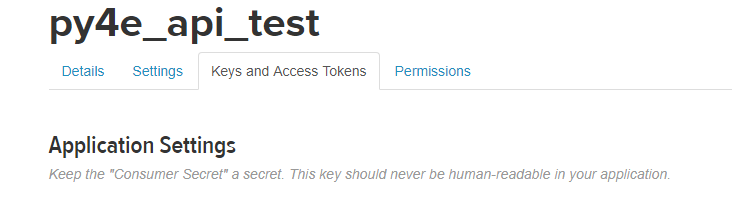
Once the app is created you should see that in your twitter apps page. Click on it and GOTO the Keys and Access Tokens tab.

twitter apps tabs

There you will see four pieces of information. First you have your app API keys which are consumer key and consumer secret. Then you have your access token and access token secret.

We'll need all of them to access twitter API's. So, have them ready. I have copied all of them and exported them as system variables. You could do the same or if you'd like, you can read them from a file as well.

Let's get started

First you have to import tweepy and os(only if you are accessing system variables).

import tweepy
import os

Then I'll populate the access variables by reading them environment variables.

consumer_key = os.environ["t_consumer_key"]
consumer_secret = os.environ["t_consumer_secret"]
access_token = os.environ["t_access_token"]
access_token_secret = os.environ["t_access_token_secret"]

With the keys ready, we setup the authorization.

authorization = tweepy.OAuthHandler(consumer_key, consumer_secret)
authorization.set_access_token(access_token, access_token_secret)

After authorization we create an API object twitter

twitter = tweepy.API(authorization)

And now you can tweet from python using this twitter object like this.

twitter.update_status("Tweet using #tweepy")

That is all you have to do. Just five lines of code and you can already tweet. You should try it out and check your twitter account. I just ran this command and this is the tweet.

Not just this, you can also tweet media. Let's tweet again, this time with a picture attached.

image = os.environ['USERPROFILE'] + "\\Pictures\\cubes.jpg"
twitter.update_with_media(image, "Tweet with media using #tweepy")

And this is the media tweet.

When you run the previous commands, you'll see that there is a lot of output that is printed on the terminal. This is a status object with a lot of useful data like the number of followers you got, your profile picture URL, your location etc., pretty much everything you get from your twitter page. We can make use of this information, If we are building something more comprehensive.

Apart from sending regular tweets, you can also reply to existing tweets. To reply to a tweet you'd first need its tweet_id which you can get from the tweet's URL.

For example the URL for previous tweet is https://twitter.com/durgaswaroop/status/945049796238118912 and the tweet_id is 945049796238118912.

Using that id, we can send another tweet as reply.

id_of_tweet_to_reply = "945049796238118912"
twitter.update_status("Reply to a tweet using #tweepy", in_reply_to_status_id=id_of_tweet_to_reply)

The only change in the syntax is in_reply_to_status_id=id_of_tweet_to_reply that is passed as the second argument. And with that our new tweet will be added as reply to the original tweet.

The new reply tweet is this:

That's how easy it is to access Twitter API with tweepy. We now know how to tweet and how to reply to a tweet. Building up from this knowledge, In a later tutorial, I can show you how to create your own twitter chat-bot and also twitter streaming analysis.

The full code of things covered in this article is available as gist at


For more programming and Python articles, checkout Freblogg and Freblogg/Python

Web Scraping For Beginner with Python


This is the third article as part of my twitter challenge #30DaysOfBlogging. Twenty-seven more articles on various topics including but not limited to Java, Git, Vim, Software Development, Python, to come.

If you are interested in this, make sure to follow me on Twitter @durgaswaroop. While you're at it, Go ahead and subscribe to this blog and my blog on Medium as well.


If you are interested in contributing to any open source projects and haven't found the right project or if you were unsure on how to begin, I would like to suggest my own project, Delorean which is a Distributed Version control system, built from scratch in scala. You can contribute not only in the form of code, but also with usage documentation and also by identifying any bugs in the functionality.


Thanks for reading. See you again in the next article.
December 23, 2017

Sessions in Vim

14:30 Posted by Freblogg , , , No comments

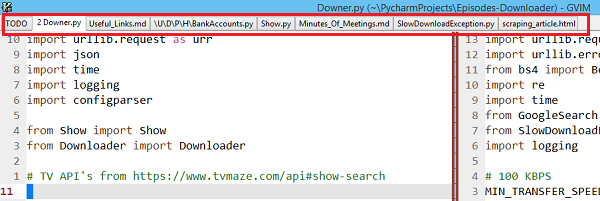
I love to have a lot of tabs open at the same time in Vim. Being the deputy Scrum master (Yeah, it is a thing) of our dev-team, I have to keep track of a lot of things going on in the team. I maintain a repository of all the links to product documentation, stories, tasks etc. I also need to keep track of the discussions that happened in various team meetings. On top of this, as a backend engineer I have my own stories and tasks to manage as well. All of this means that, I have a ton of tabs and splits open at any given time in Vim. Something like the following:

Vim multiple tabs open

Now, the problem comes when I have to shutdown and start my computer. All the tabs I have kept open for several days will be gone and I have to open them up all again and put them in the order I want. Oh, the pain!. There has to a better way!

There has to be a better way

Luckily for us Vim always has a better way to do something. There is an inbuilt feature just for this.

It is called Vim-sessions and with that you can get back all your tabs with just one command. How nice!

How to create a new session?

To create a vim session, run the command :mksession episodes.session. Here episodes is the name of the session I want to create.

In short, :mks <session-name>.session. And that’s it. Your session is now saved. It saves information about what tabs are currently open, what splits are open and even what buffers are open, all into that session file.

Note: The .session suffix is not needed. But it is the preferred way as you can easily identify the session file.

Once this is done, you can go ahead and close your tabs as all of that is stored in the session file.

How to open an existing session?

Now that we have the session saved, the next time you want to open all of those tabs, all you have to do is tell Vim to run that session. You do that by running the command :so <session-file-path>(:so is short for :source).

And boom. All of your windows and tabs are back with just one command. You don’t have to have multiple tmux or screen buffers running anymore. Vim can do all of that with just one command.

That is all you need to know about sessions in vim to make yourself productive. You can always try the vim help with :help session-file and find out more.


For more Vim articles, checkout Freblogg/Vim

Beginner Vim Tutorials - Your First Lesson In Vim

Vim Color scheme used: Eclipse


This is the first article as part of my twitter challenge #30DaysOfBlogging. Twenty-nine more articles on various topics including but not limited to Java, Git, Vim, Software Development, Python, to come.

If you are interested in this, make sure to follow me on Twitter @durgaswaroop. While you’re at it, Go ahead and subscribe to this blog and my blog on Medium as well.


If you are interested in contributing to any open source projects and haven’t found the right project or if you were unsure on how to begin, I would like to suggest my own project, Delorean which is a Distributed Version control system, built from scratch in scala. You can contribute not only in the form of code, but also with usage documentation and also by identifying any bugs in the functionality.


Thanks for reading. See you again in the next article.
September 11, 2017

How to recover from 'git reset --hard" | Git

12:30 Posted by Freblogg , , No comments
Git is an amazingly powerful tool. But, as Uncle Ben said,
With great power, comes great responsibility
And that is true for Git as well. If you are not careful when using it, you could easily burn your a**.
So, If something like that happened to you, Or If you want to make sure that never happens to you, then watch this video.


Subscribe to the channel for more videos like this.

August 26, 2017

August 12, 2017

Matrix Multiplication | C Programming

We have discussed about Matrix arithmetic in my recent youtube tutorial.


In that, I have already shown how Matrix addition and subtraction can be done and asked you to try multiplication themselves. Hopefully you have been able to do that Or atleast tried it out before coming here to see my solution.

For this example, I have taken two matrices as follows.


Matrix1 has 3 rows and 4 columns and Matrix2 has 4 rows and 3 columns. And now, the code to multiply these two matrices.
#include "stdio.h"
main() {

    int matrix1[3][4] = { {1,2,3,4}, {3,4,1,2}, {4,1,2,3} };
    int matrix2[4][3] = { {0,1,2}, {1,2,0}, {2,0,1}, {1,0,2} };
    
    // Values from the matrices. No. of columns in matrix1 = No. of rows in matrix2. Matrix Multiplication possible
    int rows1 = 3, cols1 = 4, rows2 = 4, cols2 = 3;        
    
    // Initialize the resultant matrix with all zeroes
    int mult_matrix[3][3] = {0};
    
    // Loop variables
    int i=0, j=0, k=0;
        
    for(i = 0; i < rows1; i++) {
        for(j = 0; j < cols2; j++) {
            for(k = 0; k < cols1; k++) {
                // Since we are initializing with zero, we can add new values to the previous value to get the final value
                mult_matrix[i][j] += matrix1[i][k] * matrix2[k][j];
            }
        }
    }
    
    //  Print the new matrix
    for(i = 0; i < rows1; i++) {
        for(j = 0; j < cols2; j++) {
            printf("%d ", mult_matrix[i][j]);
        }
        printf("\n");
    }
}

And when you run this program, you get the following output as one would expect:
12 5 13
8 11 11
8 6 16

Press any key to continue . . .
The comments, along with the explanation in the video should be enough for you to understand this code directly.But, do reach out on social media for any queries.

That's all for this article.
As, always, Have a happy reading and Stay Awesome !

If you have liked this article and would like to see more, subscribe to our Facebook and G+ pages.

Facebook page @ Facebook.com/freblogg

Google Plus Page @ Google.com/freblogg