Showing posts with label Git. Show all posts

September 11, 2017

How to recover from 'git reset --hard" | Git

12:30 Posted by Freblogg , , No comments
Git is an amazingly powerful tool. But, as Uncle Ben said,
With great power, comes great responsibility
And that is true for Git as well. If you are not careful when using it, you could easily burn your a**.
So, If something like that happened to you, Or If you want to make sure that never happens to you, then watch this video.


Subscribe to the channel for more videos like this.

February 20, 2017

Git Cherrypick

08:56 Posted by Freblogg , , No comments
Cherrypick is one of the most useful commands in Git. It is used to apply a commit that is present on another branch, on the current branch. Let's see an example to understand this better.

Let’s say you have two branches feature1 and feature2 as in the following picture.


Now, the green commit 5 on branch 2, has some interesting code that you want on feature1. How would you get that? You are probably thinking about merge/rebase. But with that you will get all the other green commits from 1–4 as well, which you don’t want.
Cherrypick for the rescue!.

Assuming you are on feature1, all you have to say is

git cherry-pick green5 (Assuming 'green5' is the commit id)

And that’s it. You will have the green5 commit on your orange4 commit like in this picture as you wanted.


Notice, that the green commit is no longer “5” but has been changed to “5′”. This is to show that, though the changes (change set is the git term) in the commit remain the same, Git will generate a new commit hash for this because hashes take parent node also into account.

And that is all you need to know about Cherry picking. So, Go ahead and pick some cherries!


For more interesting articles,
Subscribe to Freblogg's RSS feed. Its a great way to get all the new articles directly.
Follow FreBlogg on Facebook and follow @durgaswaroop on Twitter

January 31, 2017

Git Merge Vs. Git Rebase

03:30 Posted by Freblogg , , , , No comments
Merge and Rebase are two strategies available in Git to combine two ( or more) branches into one branch.
Let’s say we have two branches feature1 and feature2 that have diverged from a common commit “a” to have four commits each.


Now we want to combine both the features into a single branch. Merge and Rebase are our options. Let’s see what each of them can do.

Git Merge:

Merge will seem like a fairly obvious thing, if you look at the end result. It is pretty much like taking two threads and tying them up in a knot.


Here the commit ‘b’, has the information regarding all the commits in feature1 and feature2. So, Merge preserves the history of the repository.

Git Rebase:

Rebase on the other hand doesn’t preserve the history. It quite literally re-bases one branch on top of the other i.e., it changes the base of the branch. Let’s see rebasing with the same example.
Let’s say I want to rebase feature1 onto feature2, what that means is that I want all the commits in the branch feature1 on top of the commits of feature2. So, after rebase your commit history would look like the following.


As you see in the picture, the base of feature1 which was previously the commit “a”, has been shifted to the green commit “4”. Hence the name Re-Base. Here feature1 is sitting on top of feature2 as opposed to being on “a”.

Do note that I have added a next to the numbers of feature branch making them 1’, 2′ and so on, to indicate that the orange 1′ commit is different from the orange 1 commit. This is because each commit, apart from storing the changes to the files, stores the information regarding its parent. So, If a parent to a commit changes, even it has the exact sames modifications to the files, will be treated as a different commit by Git, which means we have changed the Git commit history.

Also Anyone who looks at the commit history now, would think that feature1 was added after feature2 which is not what actually happened. If this is the end result you’re going for, then it’s absolutely fine but if you want to show that feature1 and feature2 both started off simultaneously, then you need to use Merge.

Both Merge and Rebase have their pros and cons. Merge keeps the history of the repository but can make it hard for someone to understand and follow what’s going on at a particular stage when there are multiple merges. Rebase on the other hand ‘rewrites’ history (read - creates new history) but makes the repo look cleaner and is much easier to look at.

What you want to use depends on your need. A lot of companies make merges mandatory when adding stuff to master branch because they want to see the history of all changes. And a few companies/Open source projects mandate rebasing as it keeps the flow simple and easy to follow. Use the one that suits your workflow.

Fun Fact:
There is a merge strategy called Octopus merge, where you merge multiple branches into one. For more info on this: Understanding Git Octopus Merge | FreBlogg


For more interesting articles,
Subscribe to Freblogg's RSS feed. Its a great way to get all the new articles directly.
Follow FreBlogg on Facebook and follow @durgaswaroop on Twitter

December 20, 2016

Understanding Git Octopus Merge

The Code for Git merge is one of the most sophisticated pieces of software ever written. There is so much stuff that goes inside during a merge that its just mind boggling. Just for that alone, Linus could be considered a programming genius. Too bad for other geniuses, he has Linux kernel on his resume :-D.

Git Logo

As the title suggests this article is about Octopus Merge in Git. For this I hope you know what a basic Git merge is and what it means to merge. If you're completely unfamiliar with Git, then I've no idea what you're doing here. You better read up on some Git 101 before jumping to this article.

Anyway, Just to brush up, this is how a simple/familiar Git merge goes ..

We have a branch called feature that diverged from master at the second commit and went to have two commits of its own.
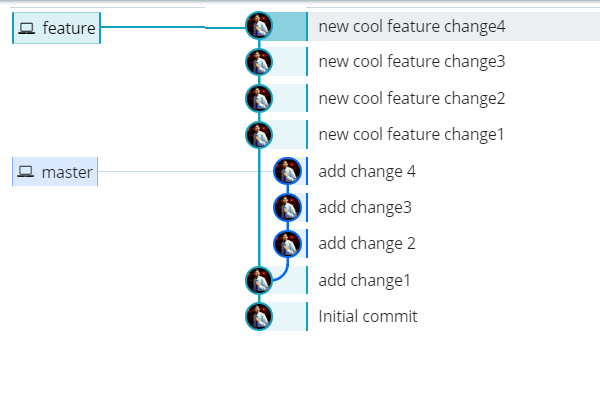
Master and Feature branches in Git

Note: For the branch pictures in this article I am using a Git GUI tool called Git Kraken. I have been trying it a few days now and it looks quite promising. I am a fan of its clean and minimalist UI and have been using it extensively for the beautiful visualization of branches. And above all, It is free for personal non-commercial use. So, you can try it out for free.

Now you want to add those cool new changes on the feature branch to master. The way you do it is by merging (Let's not talk about Rebasing for now. We will look at it another time). So, when you merge this is how it looks like.
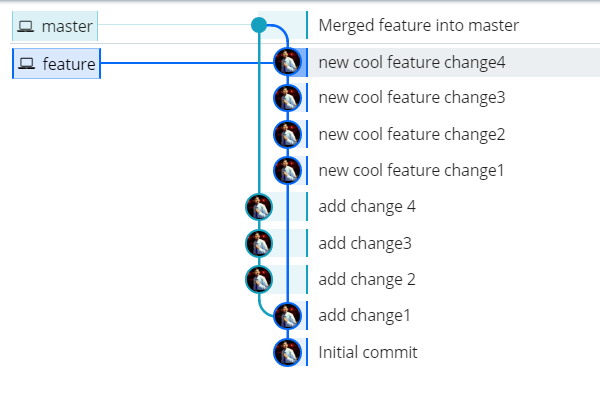
Git merge master feature

This is all the usual stuff that we are all familiar with.

Now there is another type of merge called the The Octopus Merge. At least some of you must have heard about it either from an online video or from a colleague in your office that seems to know everything. Either way the Octopus merge is a really fun way of Merging. You probably won't get to do this at your work as a lot of companies think this complicates things and we all know how much Companies hate complexity. Anyway, Let's see what it looks like. I have a local git repository with three branches branch1, branch2, branch3 along with master. All four of these branches have two extra commits from the point they diverged.
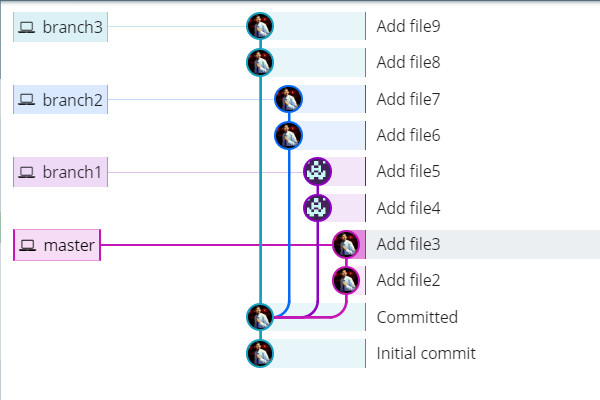
Git octopus pre image

Now if you want to merge them, the usual way would be to merge two branches at a time to finally get to the final combination after three merges like so.
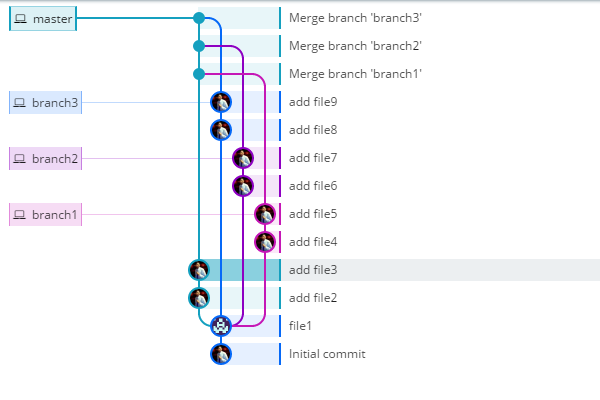
The usual way to merge branches in Git

This may seem fine and might actually be the only way you would think about this if not for the Octopus merge. You have three merge commits here and as we know merge commits are noise. They pollute the history of your repository and interrupt the story told by your Git history. So, how about keeping the noise low by just having one Merge commit instead of three. How you ask? Octopus, My friend. All hail the great and mighty Octopus. So, the way you perform an Octopus is by merging all the branches at once on to the master. To do that you give a command like this
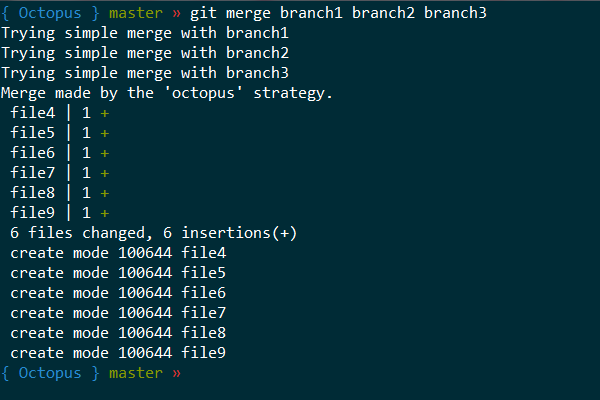
Git merge octopus

This will merge all the three branches to master. The branches will look something like this. Do you see the reference of Octopus now?
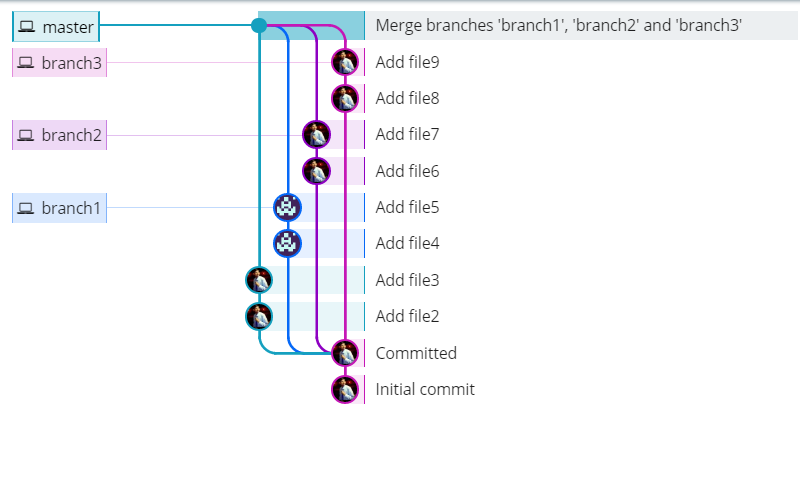
Octopus Git merge

Now, if you know anything about octopuses, you might be wondering that we only have four legs here while an Octopus has 8. Well you are right. Octopuses do have 8 legs (technically 6 as two of them are used as hands) but 4 is good enough. Actually any merge can be called Octopus if you're merging three or more branches.

If you are using Git for sometime, you might be wondering, If Octopus is so freaking cool, why haven't more people heard about it and Why are more people not using it. Well, you are right my friend. Octopus is awesome for sure, but as I said it certainly does complicate things a lot especially when dealing with merge conflicts. Merge is hard enough as it is when dealing with just two branches. But if you are merging 5 or 10 branches together it feels like you're doing a complex surgery. You have to be really careful in that case and I am not even sure if any modern GUI tools support diffing 10-way. Also a lot of people tend to go overboard with Octopus.

Look at this message where Linus Torvalds yells (pleasantly) at a guy for creating an Octopus with 66 branches. Imagine that for a second. 66 branches! I wouldn't want to be the guy that handles merge conflicts on that one! Linux aptly says

that's not an octopus, that's a Cthulhu merge

Cthulu Image

So, a lot of companies don't really use this. A lot of people won't even consider this for their Merge strategies.

A rule of thumb to follow with Octopus is to never overdo it. An 8-way octopus merge though borders on crazy hard and insane, is fine but more than that is an overkill. The situations where you have to merge more than 5 or 6 branches tend to be very rare and in those cases may be you can go for an Octopus on a subset of branches at a time and do a Octopus for those. Or may be rethink your merging strategy.

Either way, I hope this article helped you in understanding something new and gives you some ideas for dealing with complex merges. I hope you will educate your peers and colleagues about this new merge and share this article with them

Well, That is all for this article folks. See you again in the next one. Until then, Good Bye.


For more interesting articles,

Subscribe to Freblogg's RSS feed. Its a great way to get all the new articles directly.

Follow FreBlogg on Facebook and follow @durgaswaroop on Twitter

Special Thanks to Git Kraken team at Axosoft for developing a great tool like Kraken.

Attributions:

Cthulhu Image : https://commons.wikimedia.org/wiki/File:Cthulhu_and_R'lyeh.jpg